Ask your AI assistant about a token
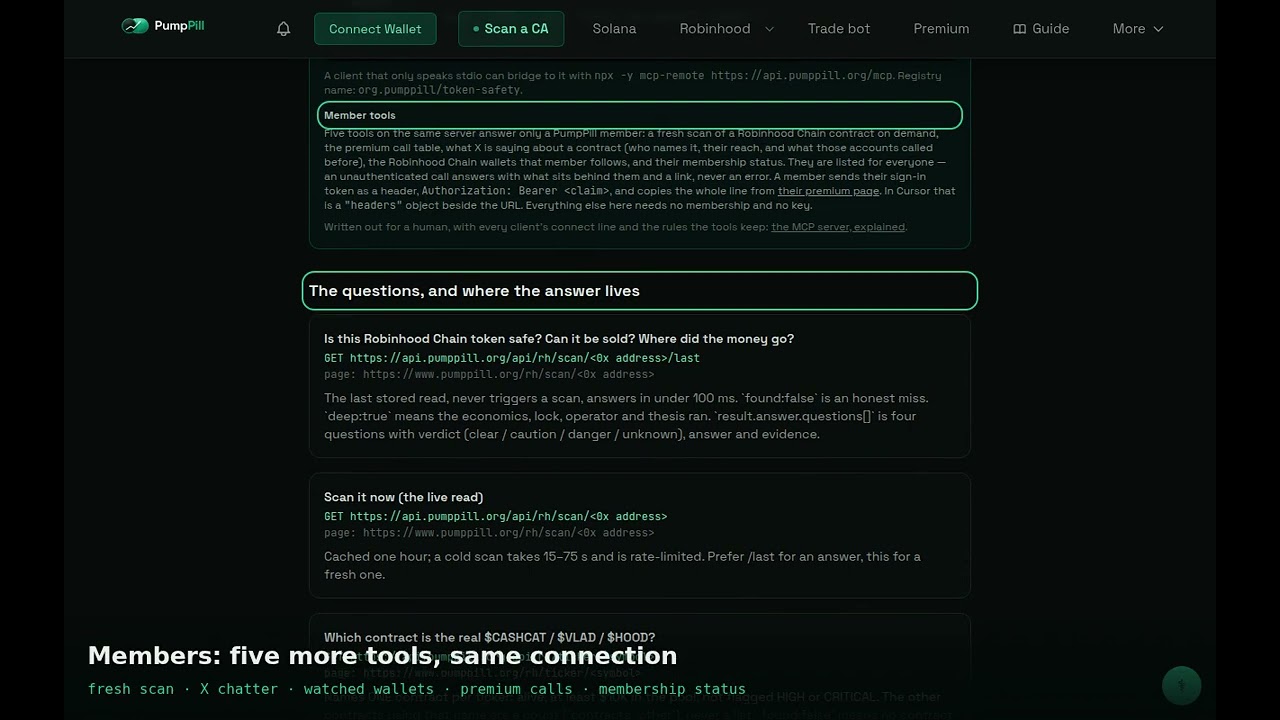
With one address added to its settings, it can ask PumpPill about any Robinhood Chain or Solana token and quote the answer with a citation and a time stamp. This lesson covers what the server is, how to connect it in Claude, Cursor, VS Code and ChatGPT, what each tool answers, and the limits every answer carries.
The demo video was recorded on 26 September, before version 1.3.0 shipped, so it does not show the FOMO tools, the room's calls or the "what is moving" call described below.
What it is
MCP stands for Model Context Protocol, a standard way for an AI assistant to call outside tools. PumpPill runs an MCP server at https://api.pumppill.org/mcp. It needs no key and no account, and nothing is installed on your machine.
The server exposes twenty-four tools. Twenty answer anyone; four answer a PumpPill member, and three of those can also be bought one call at a time. Version 1.3.0 added the FOMO data in full (the fomo block on token answers, gatherings with PumpPill's read on each token, and fomo_trader), the room's graded call list, a single "what is moving" call, and a trade link on every token answer.
The page at /for-agents describes the same data for a human reader, with one-click Add to Cursor and Add to VS Code buttons.
How to use it
- Claude Code, one line in a terminal:
claude mcp add --transport http pumppill https://api.pumppill.org/mcp - Claude on the web or desktop (Pro, Max, Team, Enterprise): Settings, then Connectors, then Add custom connector. Name it PumpPill, paste the address, and leave the OAuth fields empty.
- Cursor, Windsurf, Cline: add
{ "mcpServers": { "pumppill": { "url": "https://api.pumppill.org/mcp" } } }to the client's MCP file (Cursor's is ~/.cursor/mcp.json). Or press Add to Cursor on /for-agents. - VS Code: in .vscode/mcp.json,
{ "servers": { "pumppill": { "type": "http", "url": "https://api.pumppill.org/mcp" } } }. Or press Add to VS Code on /for-agents. - ChatGPT: add the same address as a connector. ChatGPT calls two tools,
searchandfetch. - Ask a question in plain words: "Is 0x... safe to buy?", "Which contract is the real $HOOD?", "What are FOMO traders buying right now?" The assistant picks the tool.
- Read the
citeand the time stamp in the answer. The read was taken then, not when you asked.
A member who wants the member tools sends the sign-in token from their premium page as a header, Authorization: Bearer <claim>, in Cursor as a "headers" object beside the URL. Claude on the web and ChatGPT cannot send a custom header, so the member tools are for editor clients.
How to read what it shows
One token. rh_token_safety reads a Robinhood Chain contract as last read: can it be sold, what is flagged, where the launch money went. sol_token_detail does the same for a Solana token: holders, the bundled-launch read, what the deployer still holds, and a one-sentence verdict. Both carry a fomo block when FOMO app traders traded the token. exit_check answers sellability and what the deployer can still do, on both chains.
Which contract. rh_ticker_resolve names the one Robinhood Chain contract worth naming for a ticker: alive, at least ten thousand dollars in its pool, not flagged. Other contracts using the name come back as a count, never a list.
Wallets. rh_deployer_record is one wallet's launches and how they went. rh_whale_wallets lists wallets that hold enough to move a pool. rh_wallet_record is one wallet's holdings and trades. rh_early_wallets and sol_early_wallets name the wallets that were early on tokens that went on to cross a threshold, with the base rate beside each figure.
The chain. rh_flagged_recent is the last thirty days of tokens whose latest scan found high or critical structural risk. rh_stock_pairs lists memecoins quoted in tokenized stocks. rh_chain_stats gives the chain's counts with the method attached. outcomes_measured is what the tokens PumpPill logged went on to do, on both chains, losers in the denominator.
Right now. fomo_gathering lists tokens that several different FOMO app traders bought inside a window, each with the first and latest buy seen, how many are still in, and PumpPill's own read. fomo_trader is one FOMO trader's week by name: buys with the market cap, sells with the profit the feed reported, and a record once fifteen buys are scored. room_calls is the list of calls PumpPill's room posted, graded, losers included, open to anyone ten minutes behind the members. whats_moving puts gatherings, room calls and new flags in one answer, and takes the previous answer's time as since so a polling agent gets only what changed.
Members. rh_scan_now reads a Robinhood Chain contract fresh, twenty a day per member. premium_calls_recent is the member call table. my_watched_wallets is the wallets that member follows. x_chatter is what X is saying about one contract. membership_status, open to anyone, says whether the connection is signed in. Without a membership, an agent with a wallet can buy one answer at a time from three of them, paid in USDC on Base: a fresh scan for five cents, X chatter for five cents, the premium call table for ten cents. A miss, an error or a daily limit costs nothing.
The trade link. Every answer about one token carries a link that opens @PumpPill_Trade_Bot with that contract loaded. It is on every token whatever its read says, and the instructions tell the assistant it is not a pick.
What it does not tell you
found: false means the contract is not in PumpPill's index. It is not a statement that the token is safe. On a genuine miss the address is queued for reading, and the answer says to ask again in a few minutes.
No public tool triggers a live scan. Public answers come from stored reads, each with the time it was taken.
The server sends facts, counts and citations, never a recommendation; the assistant's phrasing of the answer is the assistant's.
A flag is a finding with evidence, not a verdict on price. A count of calls is not a success rate, and outcome figures keep the losers in the denominator.
Limits: 240 requests a minute per address and 60 a minute per client; past that the server answers 429.
Try it
Open /for-agents, press Add to Cursor or paste the one line into Claude Code, then ask your assistant "what is moving on Robinhood Chain right now?" and read the citation on the answer.
What the video says the full transcript, for reading or searching
The lesson is the method. The product is where you apply it.